For the first time, as well as having all your trade and communications data in one place to make case investigation much easier, you can now also create rules that will only trigger when logic across both Trade data and Communications data fire together.
This is designed to help you create even more targeted rules and further reduce false positives. You can take advantage of this new feature by selecting the "High Profit Orders and Communications' option in the Token Browser when creating or editing an advanced Trade Surveillance rule.
By doing so you will be able to launch the token configurator, which will look like this:
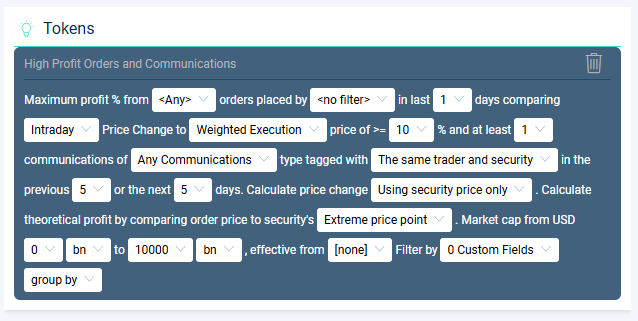
There are five new configurable parameters here (in addition to our standard High Profit trade rule options) which will allow you to include the desired communications in your rule:
How many communications - This is defaulted to 1 which is probably a good place to start your backtest but should you wish for your rule to only fire when there are multiple communication hits you can use this parameter to do so.
Which communications - This is defaulted to 'Any Communications' in the system but also gives you the option to use any saved communications search from the 'Search Data' page instead. With almost unlimited configurability in our saved searches across content types, keyword searches, lexicons, org chart composition etc this parameter allows you to really fine tune the content being considered in your rule.
Trader / Security - To avoid too much noise in your results, the communications included in the rule run will be automatically filtered to those which are tagged against either the trader or security in question from the trade side of the rule or both, depending on which option you have selected here. This will override any such settings made in your saved search.
Prior Period - With this option you can set how far before the trade was made to include in the window used to look for pre-trade communications.
Post Period - With this option you can set how far after the trade was made to include in the window used to look for post-trade communications.
As always, any time you change any of these parameters in the token on the left hand side of the screen, the backtest results on the right hand side of the screen will update.
You may notice now we have also updated the charting technology used in the backtest screen for this rule and all others, to be more interactive and easier to see how many cases would have been generated; both by showing clearer bars and also by now displaying this count above the chart.
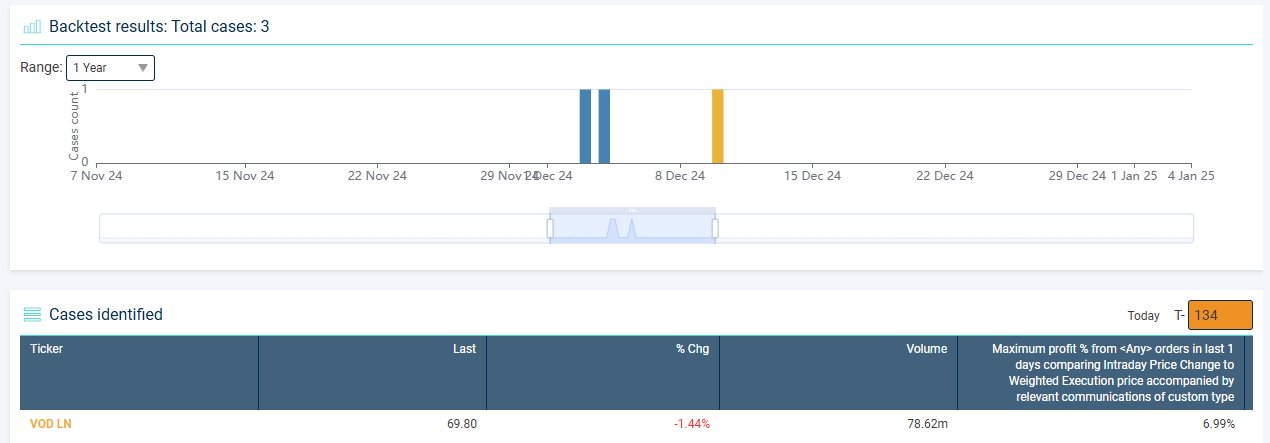
If you select an example backtest result you will be taken to the usual 'dummy' case page to give you more details about why that case would have fired if the rule was live.
In the example screenshot below, you can see immediately on the chart that there was an email 3 days before a sell trade which then went on to make a profit. You will also notice that the email itself has been automatically added to the case log along with the trade itself and you can click on that email to launch the pop-up shown which also then shows the exact email content.
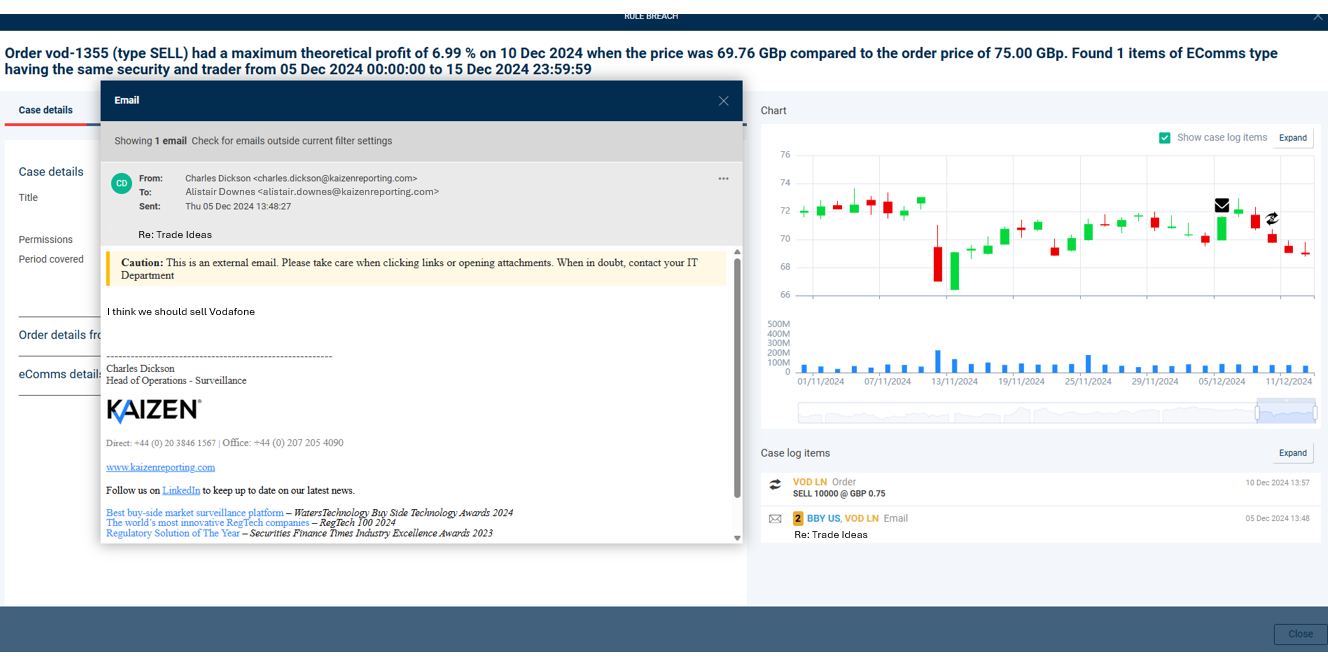
By working through the results of your backtest and being able to inspect all the relevant information for cases that would have fired based on your rule inputs, you can further refine the rule setup to ensure that your rule is generating both an appropriate number and quality of cases before making your rule active.
We believe this is a significant step in extending our offering to further leverage having all of your communications and trade data in one place. By doing so we hope to make your life easier and more effective. Look out for more exciting developments in this area coming soon...
#TradeSurveillance #CommsSurveillance #ProductUpdates